Plans and the weekly planner
Plans look after the long-term goal - a race, more distance or a daily movement habit - while the weekly planner turns that goal into the sessions right in front of you. You can run up to 3 active plans for free; Pro removes the limit.
Pick a goal type
- "Event / Race" - train towards a specific event, race, or challenge.
- "Go Further" - build distance with a structured plan on your schedule.
- "Move More" - build a daily movement habit with a time goal.
- "Weekly Distance" - hit a weekly distance target at your own pace.
"Go Further" repeats three build weeks and one rest week, with no taper or race. For "Move More" and "Weekly Distance", set your daily-time or weekly-distance goal and choose a duration - 4, 8 or 12 weeks, or a custom length.
Create an event plan
Name the plan, add the race - "Find Event" searches the race directory and pre-fills the details - then choose the activity type and pick the race distance from the common-distance chips.
"Week starts on" any weekday you like, "Suggested training start" lands around 16 weeks before race day, and you can add an optional race start time.
"Week 1 distance" is suggested from your level and race distance; optionally add "Week 1 elevation" and switch on "Track elevation".
ulTrain generates Build, Rest, Taper and Race weeks - every week is editable - then tap "Create Plan" on the "Ready to create!" screen.
Picked up a niggle mid-plan? Use "Mark as Injured" on a week: injured weeks skip their targets but still count. And if you change targets later, ulTrain asks "Regenerate Week Targets?" - regenerating never deletes logged activities.
Manage your plans
"My Plans" lists everything with search, Plan Type and Activity filters and Active, Upcoming and Past groups; archived plans sit behind Settings → "Show archived plans". Each plan offers Edit, Restart, Complete, Cancel (keeps your logged data, with an optional reason) and Delete. Completing an event plan can record your finish time and prompts a race review - see Events. Inside a plan you get Plan, Progress (Pro), Kit and Nutrition tabs - Kit and Nutrition are Pro on event-style plans. Open any week to see its logged activities, log a new one or tap "Edit Targets", which "Only affects this week's targets".
Plan your week (Pro)
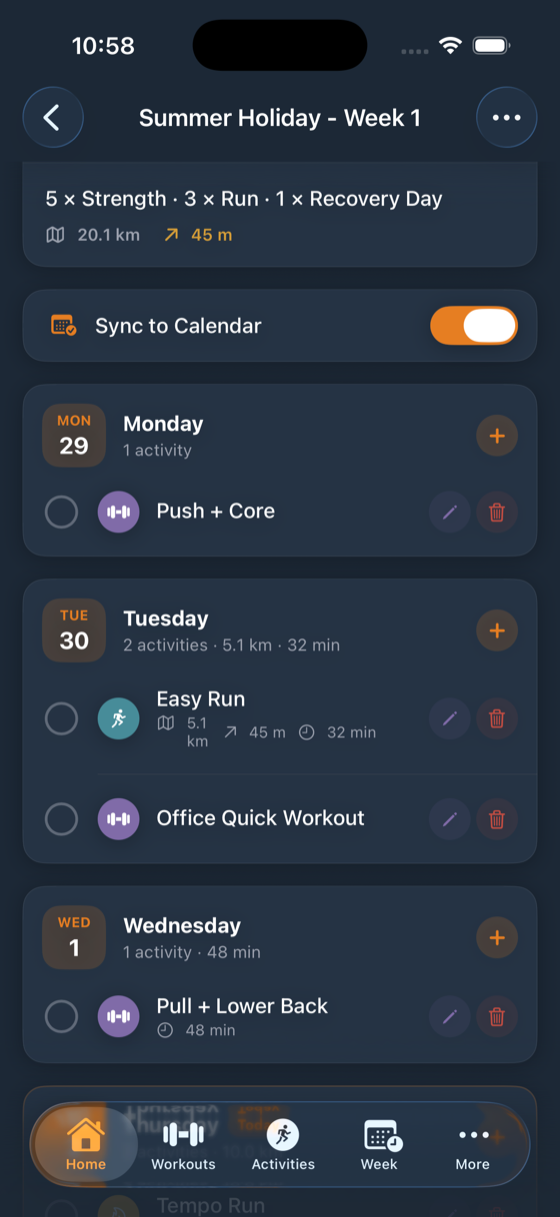
"My Week" is the day-by-day schedule. Give each day an activity - run, race, recovery, walk, hike, cycling, yoga or strength, with strength days able to attach a workout routine template (see Strength) - plus distance, elevation or duration targets and notes. Tick sessions off as you complete them, and use "Rename Week" to label a themed week. The Today's Plan card on Home mirrors today's session.
Calendar sync and reminders
Calendar sync (Pro) turns planned sessions into events in your device calendar, with a "Morning Alert - Notify at 9 AM on each activity day" option. ulTrain asks for calendar permission only when you switch it on.
Both platforms can also send a "Training Reminder" at your chosen hour, race countdowns 14, 7 and 1 days out, a weekly summary on Sunday evening and streak-at-risk alerts. Prefer fewer nudges? Turn off "Prompt to create a plan" and "Prompt to plan your week" in Settings.